


WardBeeby ScanComb
ISO 27001 and SOC 2 evidence, collected from your cloud and code.
Automated checks on your cloud and code, reviewed evidence for everything else, and a score that never counts what it can't verify.
Available today: AWS, GitHub, and GitLab, plus Azure (preview, limited access). GCP is coming soon. Review access and security
Product questions: pricing, integrations, AI, and review scopeControls · ISO 27001
| Control | Technical status |
|---|---|
A.8.5 Secure authentication | PASS |
A.8.24 Use of cryptography | FAIL |
A.8.13 Information backup | UNKNOWN |
A.5.1 Policies for information security | MANUAL |
A.8.15 Logging | PASS |
What is WardBee?
WardBee is ScanComb's compliance automation platform for engineering and security teams. Bring cloud and repository evidence, framework checks, risks, remediation tasks, policies, and audit reports into one workspace. Product assurance adds component inventories, vulnerability handling, and CRA readiness. Every result shows what is verified and what still needs review.
ScanComb also brings together hands-on security services and open-source AWS tools.
Integrations
Connect your cloud and code. Get the full picture.
WardBee connects with read-only access, collects evidence on every sync and maps it to the frameworks you report on. Review access and security
- Policies & docs
- AWS
- GitHub
- GitLab
- AzurePreview
WardBeeby ScanComb
- Collect evidence automaticallyTimestamped on every sync.
- Read-only accessWardBee never changes your systems.
- Mapped to your frameworksISO 27001, SOC 2, NIST, CIS and the EU CRA.
We won't guess.
WardBee counts only verified results as passes. It shows 7 assessment states; the 5 Not confirmed states are never counted as passes. Not applicable is tracked separately and excluded from the applicable-control score.
Confirmed
Verified against current evidence. These are the only states we count.
Pass
Verified by current evidence within its freshness window.
Fail
Verified as not meeting the control.
Not confirmed — never counted as a pass
Ambiguous or excluded. Surfaced by name, never rounded toward green.
Unknown
No evidence found. Not assumed compliant.
Stale
Evidence exists but has aged past its limit.
Conflict
Scanners disagree. Surfaced, not silently resolved.
Manual
Requires human evidence. Excluded from automated claims.
Error
The check itself failed to run.
Unknown, Stale, Conflict, Manual, and Error are never counted as confirmed passes.Not by default, not with AI, not to make a number look better.
How it works
Turn technical evidence into compliance.
- 01
Connect
Link your cloud accounts and repositories with least-privilege, read-only access.
- 02
Collect
Gather machine-verifiable evidence when connected systems are synchronized.
- 03
Evaluate
Match evidence to each control. Only verified results count.
- 04
Report
Generate review packages and track progress while keeping human sign-off in the loop.
Frameworks
- ISO 2700148 / 93 passed6 fail · 39 not verified
- SOC 229 / 61 passed3 fail · 29 not verified
- NIST CSF59 / 106 passed4 fail · 43 not verified
- EU CRA13 / 35 passed3 fail · 19 not verified
Mapped to the
frameworks you report on.
Inside WardBee
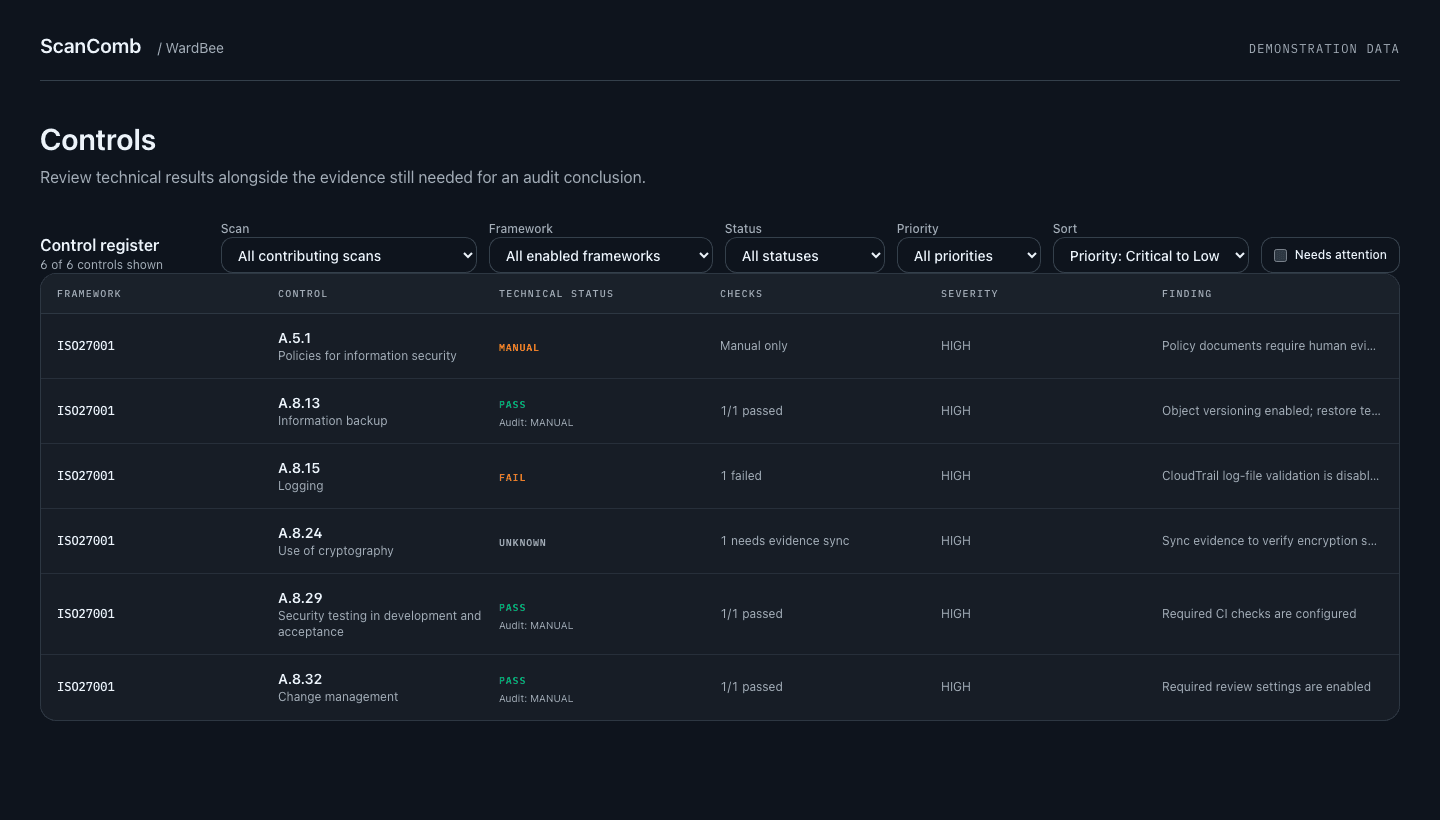
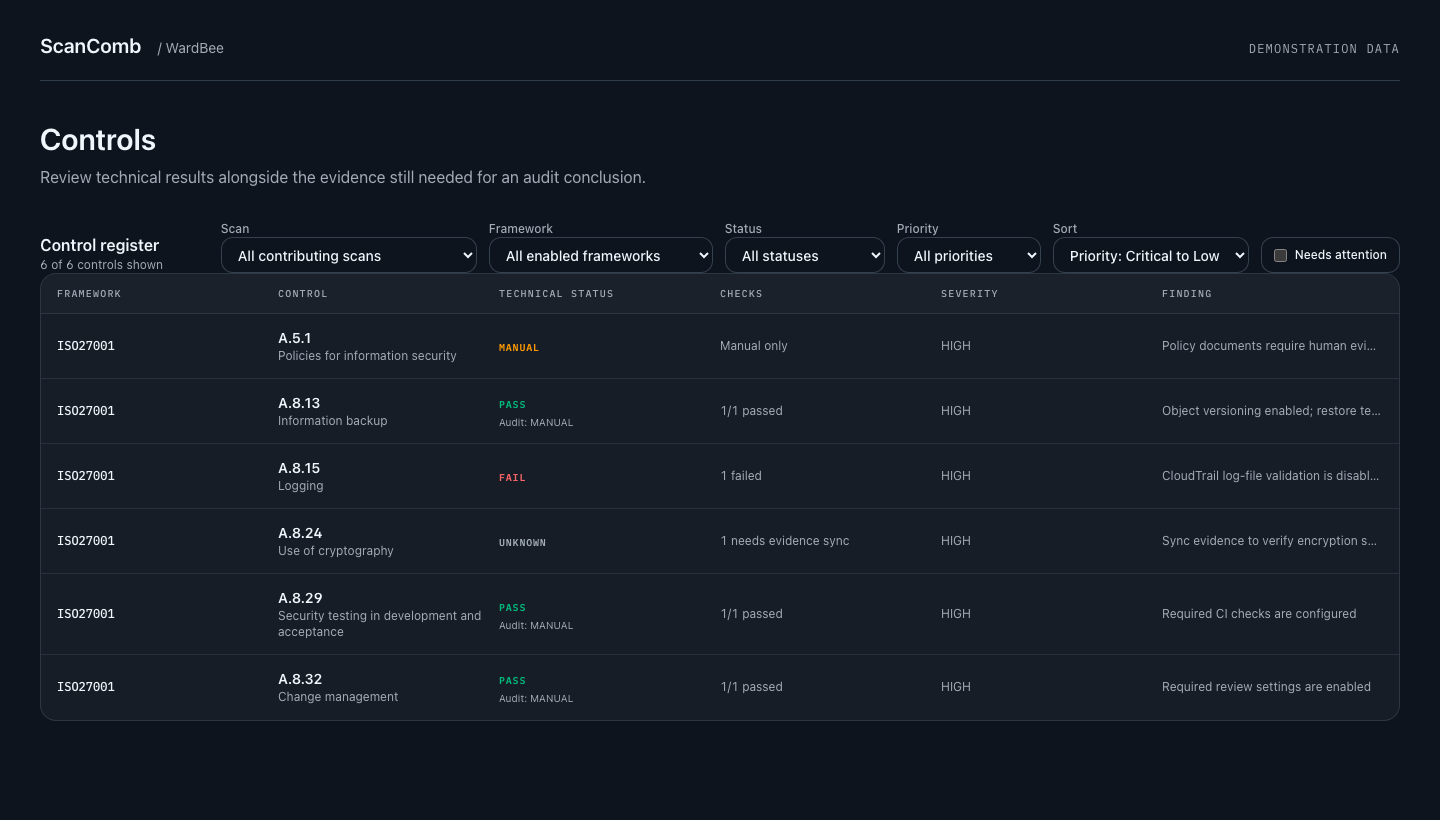
Every technical result has an evidence trail.
Automated checks give a clear pass or fail, with the evidence attached. AI explains findings and suggests fixes. It never changes a result.
Inside the workspace
From configuration checks to a reviewable evidence package.
Automated framework checks
Sync cloud and repository evidence, run a framework assessment, and follow findings through risks, remediation tasks, policies, and reports. Each technical result keeps its scope, timestamp, and evidence references.
Inspect supported catalogs and check coverageManual evidence reviews
Answer a control once and reuse the evidence across mapped frameworks. Attach records, assign an owner, track expiry, and include reviewed answers in an audit package. Available on request for your workspace.
Compare review pathsProduct assurance and EU CRA
Connect products, releases, SBOMs, and deployment records. Track vulnerability cases, recorded reporting deadlines, and versioned technical files with their supporting evidence.
Explore the CRA workflowSoftware Delivery · preview
Inspect deployment frequency, lead time, and incident-linked delivery metrics for GitHub and GitLab. Export the underlying evidence; incomplete history stays visible.
Review metrics, sources, and preview limitsManual evidence, with the reviewer attached.
A policy document and a successful API check prove different things. Choose a review path supported by the control; WardBee records the answer, evidence version, review type, and freshness separately from the automated technical result.
- Self-declared
- AI check
- Internal reviewer
- ScanComb consultant
- AI + ScanComb consultant
- External auditor
Compare review paths
- Self-declared
- Record your own assessment. It remains labeled as a declaration.
- AI check
- Check documents against a rubric with citations. A passing pre-check can support acceptance when you select this path; the result is labeled AI-checked.
- Internal reviewer
- Assign another eligible team member. Owners, editors, and evidence uploaders cannot review their own answer.
- ScanComb consultant
- Request a human advisory review using review credits, subject to reviewer capacity.
- AI + ScanComb consultant
- Combine an AI pre-screen with a human advisory review at a lower credit cost.
- External auditor
- Invite your auditor with scoped access and retain their review alongside the evidence.
- 01 · AnswerControl owner records an answer and its scope.
- 02 · EvidenceAttach a dated record and supporting documents.
- 03 · ReviewKeep the review path, citations, and decision.
- 04 · ExportInclude fresh accepted answers in an audit package.
AI-checked and consultant-reviewed evidence are not independent certification. Accepted manual answers can affect framework assessments while retaining their review-strength labels. An expired answer stops counting as current evidence.
Several clients, one login.
Consultants and service providers can run each client as its own project and see every client's score, runs and scan usage side by side.
Your practice
OWNER · current
91%
- Frameworks
- ISO27001
- Runs
- 9
- Last run
- 9/18/2026
- Scans used
- 1 this month · 4 total
- Paid from
- Own packs · 37 left
- Pool for
- Northwind Logistics
Northwind Logistics
OWNER
78%
- Frameworks
- ISO27001, SOC2
- Runs
- 24 (1 failed)
- Last run
- 9/22/2026
- Scans used
- 3 this month · 14 total
- Paid from
- Your practice pool · 37 left
Globex Retail
OWNER
83%
- Frameworks
- SOC2
- Runs
- 7
- Last run
- 9/12/2026
- Scans used
- 0 this month · 3 total
- Paid from
- Own packs · 5 left
- One project per client
- Accounts, repositories, evidence, results, score and run history stay isolated per client. Switch clients from the header.
- Choose who pays for scans
- A client buys its own scan packs, draws from a shared pool you buy once, or both. A pooled project uses its own packs and the pool's, soonest-expiring first.
- See usage per client
- Scans used this month and in total, per project, so you know what to pass on. No per-project caps to manage.
- Start from a template
- Copy frameworks, region, timezone and review settings from an existing project. Client keys and audit dates are not copied.
Client staff are invited to their own project only. Linking a pool needs owner rights on both projects and stops working if those rights are removed. Owners use two-factor authentication.
Frameworks supported
One connection, many frameworks.
Integrations
Provider integrations for source, cloud, and operational signals.
new obligation
The EU Cyber Resilience Act covers the product you ship.
Reporting duties have applied since 11 September 2026; the full regulation applies from 11 December 2027. WardBee keeps the product register, component inventories, reporting timelines, and technical documentation in one place — so the proof exists before anyone asks.
See how WardBee handles the CRAEarly warning
24 hours
Notification
72 hours
Full application
Dec 2027
Why engineering teams choose WardBee
Unknown is a state, not a rounding error
Unknown, stale, conflicting, manual, and errored results are never counted as confirmed passes. The number you show an auditor is the number supported by evidence.
See the result statesRead-only by default
Least-privilege integration model keeps your production systems safe while still producing verifiable evidence.
Evidence-grade output
Every check is timestamped and traceable, so audit exports are evidence packs, not screenshots and guesswork.
AI assistance with visible boundaries
AI explains technical findings and checks submitted documents against a rubric. AI-checked manual evidence has its own review label; it is not auditor approval and cannot override automated technical results.
Not sure which certification you need?
Use the compliance advisor to answer a few practical questions and get a prioritized, market-aware recommendation.
Try the advisorShip compliance with confidence
Read-only integrations, scoped checks, and reviewable output.